Introducing Blockwright: a 3D Minecraft structure and world editor
Blockwright 1.0 opens Minecraft .nbt, .schem and .litematic files in 3D with the textures from your own game, edits whole world saves, and generates builds with AI.
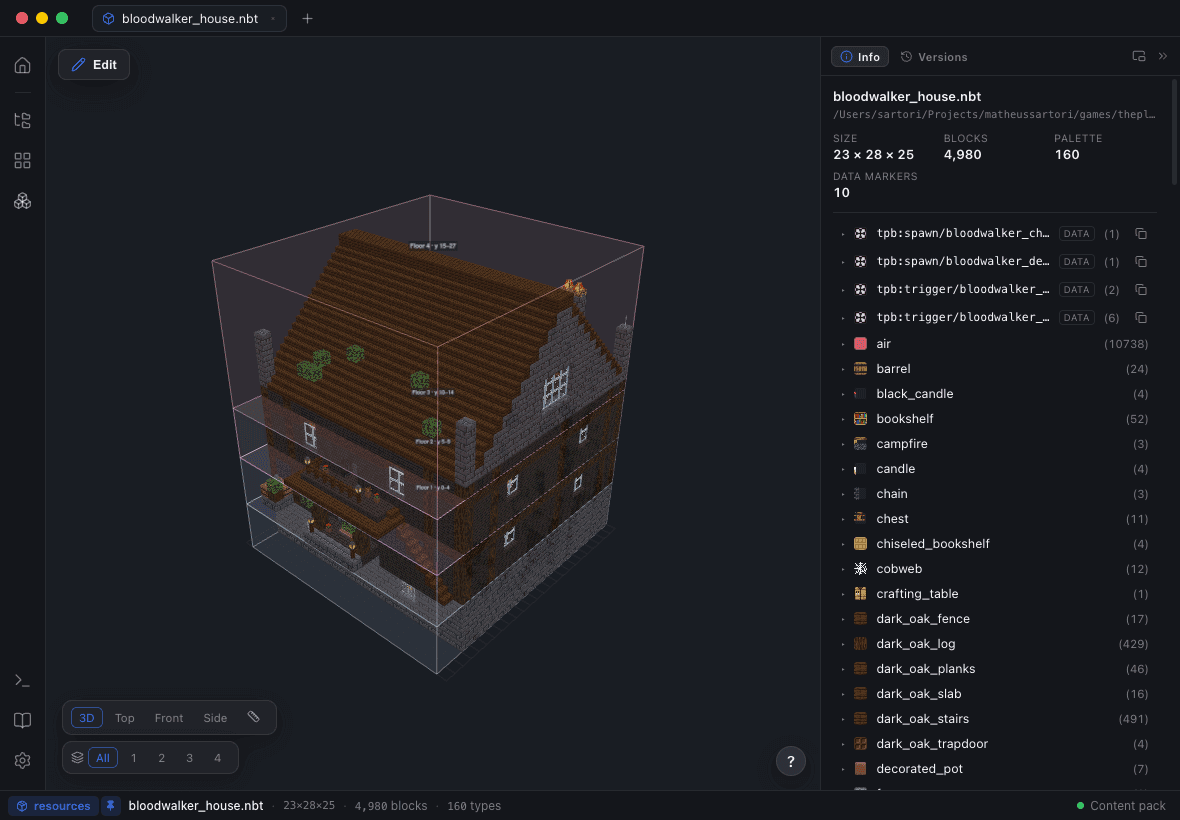
Blockwright 1.0 is out, for macOS, Windows and Linux.
It started as a way to look at a .nbt file without launching the game. It ended up as the
workbench I wanted the whole time: open any structure or any world save, see it in 3D with the
real blocks, change it, and put it back — without a single step that quietly corrupts something.
This post is the wide view of what shipped. Every section here is a thing you can do on day one.
Open what you already have
Blockwright reads the four formats builds actually travel in — Minecraft .nbt structures,
WorldEdit .schem, Litematica .litematic and Bedrock .mcstructure — and renders them as an
interactive 3D scene. Export As… converts between them, so the app doubles as the format
bridge nobody wants to think about.
The rendering is the part people notice first. Blocks are drawn with the models and textures of your own Minecraft content pack, not with an approximation baked into the app. That is a deliberate constraint: Mojang's assets can't be redistributed, so Blockwright ships none of them and asks you to point it at a version you already have. The payoff is that a modded block renders as itself, and what you see is what the game will show.
On top of the blocks:
- Block entities — chests, beds, banners, signs, item frames, all drawn from their NBT
- Animated fluids, and a Block Catalog with live 3D previews of every block it knows
- ~80 vanilla mobs as their real models — creepers, wolves, villagers, horses, the warden, the ender dragon — honoring the NBT that makes them specific: wolf coats, horse colors, sheep dyed and sheared, villager biome and profession overlays, babies at half scale, glowing-eye layers. Armor stands keep their real pose.
Whole worlds, not just structures
The same viewer opens a world save (1.13 and up, server layouts and the 26.x format included). Chunks stream in with level-of-detail as you fly, and the navigation is built for actually finding things rather than for sightseeing:
- A minimap with slime chunks, a dimension switcher, and waypoints
- Find blocks and find structures search, so "where is the nearest ancient city" is a query and not an expedition
- A Y-slice that cuts the world open horizontally — browse caves, mineshafts and your own basement like a doll's house
Editing, with a write path that refuses to be careless
With a structure open, Edit turns the viewer into the editor. Tools sit on a rail under the number keys: select, move, mirror, rotate, extrude, paint, replace, delete, and — the one that took the longest to get right — edit air and void directly, with depth targeting for multi-layer regions.
A few things that make it feel less like fighting the app:
- Magic select takes a whole connected region in one click, down to a same-family tolerance that grabs stone and bricks and their stairs and slabs
- Percentage paint patterns — type
50% stone, 30% andesite, 20% graveland let it scatter - Live symmetry and plane-locked strokes
- Blockstates stay correct through every transform: mirror a staircase and it faces the right way
- Undo/redo throughout, and every save is a new version — a mistake is never fatal
World editing is the same toolset pointed at real terrain, and it is gated on purpose. Worlds open read-only until you turn editing on in Settings ▸ World. When you do save, nothing is best-effort: the session lock is held (the dialog tells you if Minecraft is still open), every touched region is backed up, chunk NBT is patched surgically so mod data survives byte-for-byte, regions are rewritten atomically, and any chunk that fails a check is refused rather than written.
You can also place an open build into the world as an orientation-correct ghost, with terrain blending — foundation pillars down to the ground, a feathered ring, excavation where terrain pokes through, sunken basements — and extract any region back out as an editable tab or a schematic file.
Generate on the AI subscription you already pay for
Blockwright generates structures from a prompt or a reference image through an emit → render → review loop: the model writes the structure, looks at the render, and refines it. You watch the build evolve in the viewer instead of waiting on a black box.
It runs on Claude (Pro/Max) or Codex (ChatGPT Plus/Pro) — the subscription you already have. Blockwright never sells tokens and never charges per generation, and Saver / Balanced / Thorough presets let you trade spend for polish.
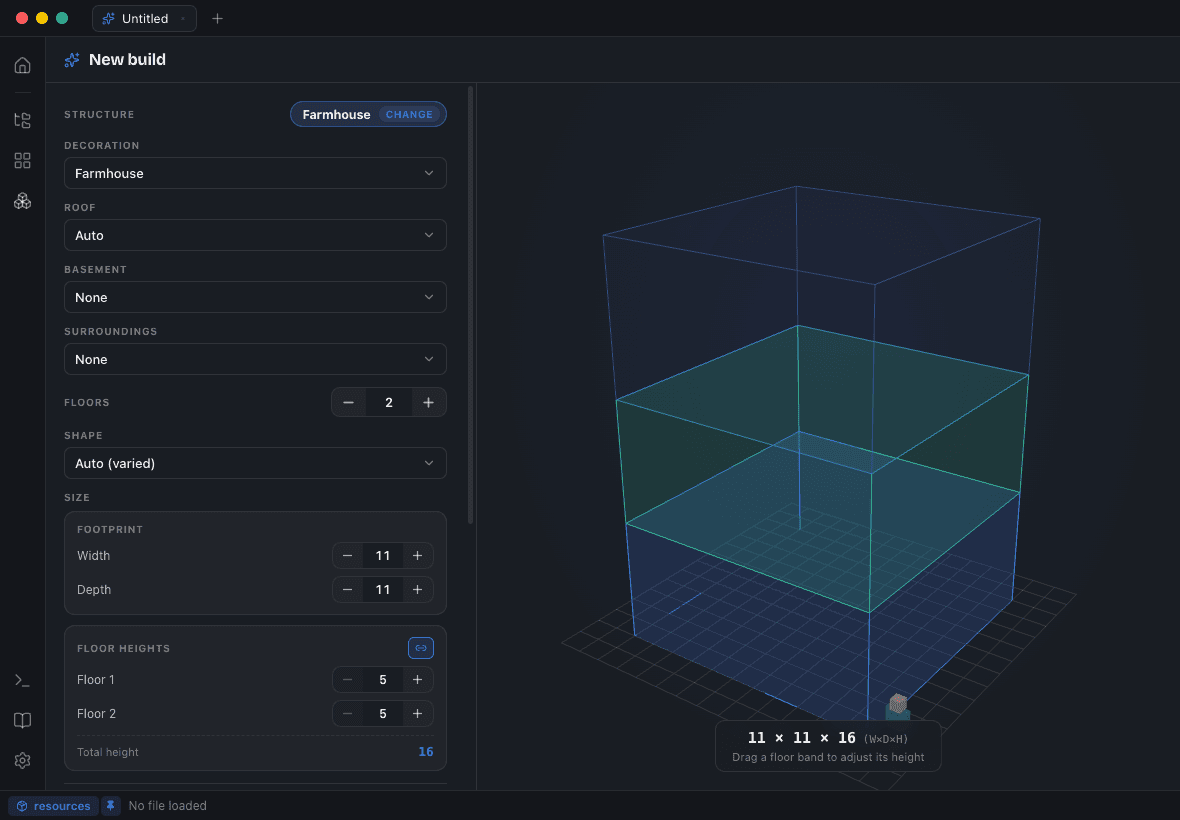
The Build Planner is how you spend fewer tokens getting there. Pick a structure type — House, Tower or Church families — and its exterior shell is built by code, not by the model, then preserved. From there you compose the rest: decoration, roof, basement, attic, yard, and up to two rooms per floor with per-floor heights. Every module has a live 3D preview in the Module Gallery before you commit to it.
Follow-up edits continue in the chat. Every build lands in a browsable library folder with its versions and a generation log.
The studio tools around a build
Four things that turn "I have a structure" into "I have the structure I wanted":
- Structure Diff — compare the open build against any file or any of its own versions. Added, removed and changed cells are marked in the viewer with a per-block summary. "What did that AI run actually change?" is one click.
- Re-theme — swap blocks across the whole build with blockstates carried over, by hand or by applying a registered decoration's entire palette. Download any build, make it yours.
- Materials — roll a build up into a gatherable bill of materials with stack and shulker-box math (doors and beds counted once, double slabs twice, fluids as buckets, entities included), exportable as CSV or JSON.
- Beauty Render — export a high-resolution PNG with a transparent or themed background and preset angles including a cross-section, or a turntable WebM, straight from the viewer.
For mod and datapack authors
This is the half of the app that doesn't fit in a screenshot.
Point Blockwright at a mod project with Open Mod Workspace… and the mod's structures render with their own textures. Annotate the useful blocks in the Block Catalog — the dictionary travels with the mod — and the planner will generate with them (Off / Mix / Prefer), shell included.
Export to Mod Workspace… writes the .nbt into the version-correct structure folder and,
optionally, the four worldgen JSON files that make it spawn in-world: structure definition,
template pool, structure set and biome tag. Every file and every problem is previewed before
anything is written.
The JSONs you used to edit by hand became panels:
- Jigsaw Lab — connector arrows and template-pool inspection in 3D, with multi-seed simulation
- Worldgen Studio — validated forms over the four worldgen files, with surgical writes
(
spawn_overrides, processors and salt survive byte-for-byte) and a live placement map - Structure Lint — per-file checks for air on the boundary, blocks your target version doesn't know, orphaned palette entries; clicking a finding focuses that cell in 3D
- Worldgen Doctor — a full data-pack audit for the silent failures that make a structure never spawn, with one-click fix-its on the safe ones
Plus the logistics: builds past the Structure Block size limit are auto-split into a jigsaw
assembly that reassembles voxel-perfectly in-world; Export to World installs a ready-to-run
datapack and hands you the /place command; Reimport from World stitches back a build you
edited in-game with vanilla Structure Blocks; and version travel upgrades a whole workspace to
its target Minecraft version, or downgrades copies to an older one — DataVersions re-stamped,
renamed block ids restored, missing blocks swapped for curated same-shape stand-ins, every change
and loss reported, originals never touched.
Watch mode keeps the viewer in sync when an external tool — a datapack build, an Axiom export, VS Code — edits your files underneath it.
Driving it from an AI agent
Blockwright ships an MCP server: a local HTTP endpoint that lets Claude Code or Claude Desktop drive builds directly. If your workflow already lives in an agent, the app becomes something it can operate rather than something you alt-tab to.
The honest notes
Three things worth knowing before you download:
- You need a content pack. Blockwright bundles no Minecraft assets. Extract a version's
assetsanddatafolders into one folder and pick it in Settings ▸ Viewer. Without one, blocks render as flat colors and everything else still works. - The builds are ad-hoc signed — no paid certificates yet — so the first launch shows an OS warning. macOS: right-click ▸ Open. Windows: More info ▸ Run anyway.
- It's a paid app, with a one-time license and no subscription. Everything runs locally; your files are never uploaded anywhere.
Getting it
Blockwright supports Minecraft releases through 26.2, ships an interface in English and Português (Brasil), and updates itself from here on.
Get the license — one payment, lifetime, all three platforms — or download the installer for macOS, Windows or Linux.
What's next
Release notes for every version will land here, and so will the things being worked on before they ship. If you'd rather not check back, the RSS feed has it all.