Open source · MIT

View, edit, generate & convert
Minecraft structures in 3D

Blockwright is a desktop studio that opens .nbt, .schem and .litematic structures and renders them with their real in-game textures — then lets you reshape them by hand or describe a build in plain language and watch the AI raise it, block by block.

Free & open sourcemacOS · Windows · LinuxPowered by Three.js
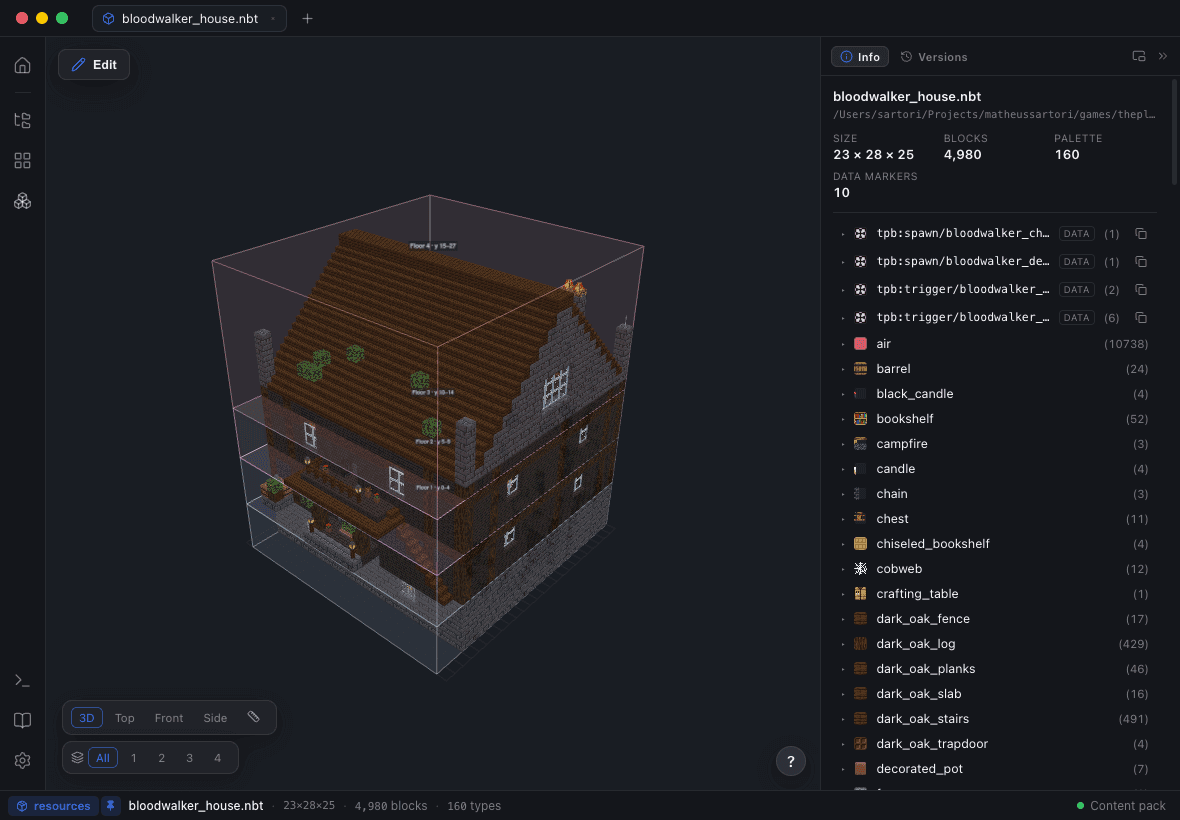
A stone house generated by Blockwright, rendered in 3D
Features

A full Minecraft structure studio

Real textures, real geometry, real-time. Everything you need to view, edit, generate and convert structures.

AI structure generation

Describe a build — optionally with a reference image — and Blockwright emits, compiles to .nbt and refines it live. Runs on your existing Claude (Pro/Max) or Codex (ChatGPT Plus/Pro) subscription — no API credits.

In-app block editor

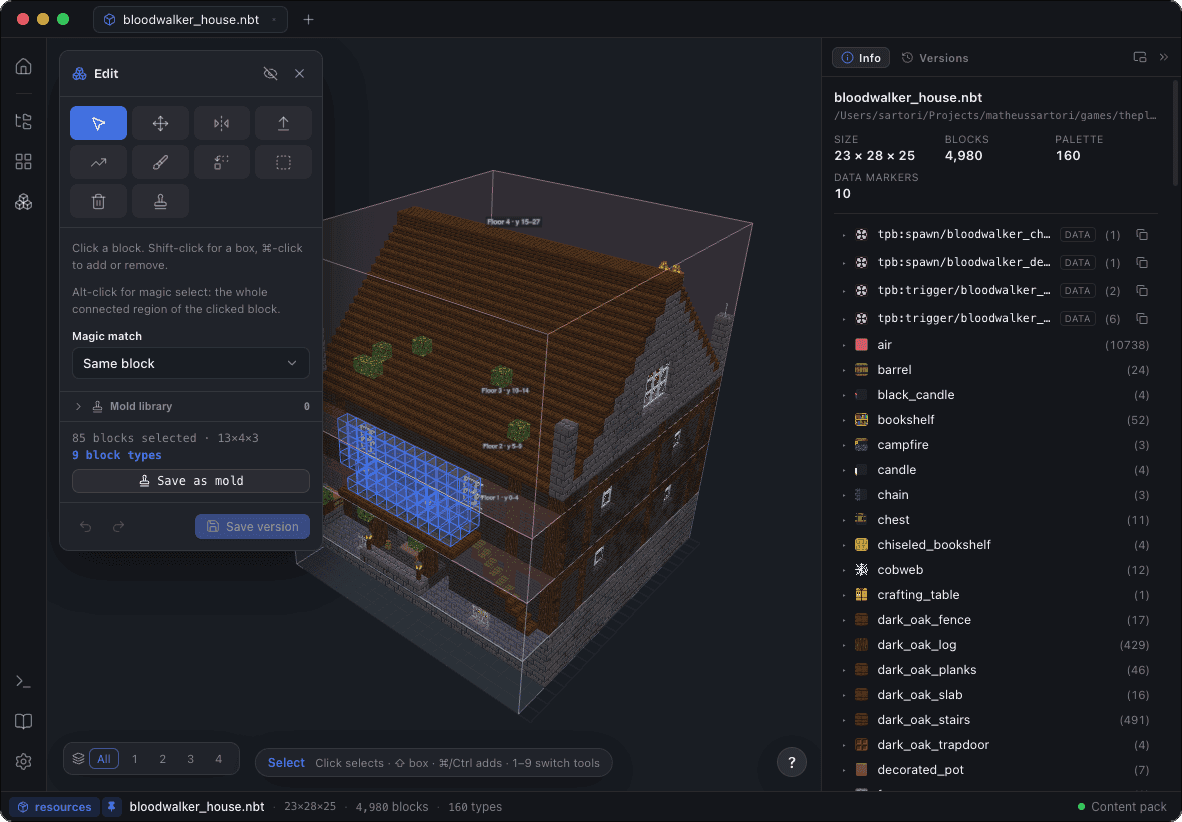
Reshape any build right in the 3D viewer — select, move, extrude, mirror and rotate, lay stairs, paint, place, replace or delete blocks, even reveal and edit the invisible air and void cells, with live symmetry, undo/redo and save-as-new-version.

Real-time 3D rendering

Block-accurate models and textures from your content pack — orbit, zoom and fly through any build.

Open & export any format

Read and write .nbt, .schem and .litematic both ways, with block entities carried through.

Composable Build Planner

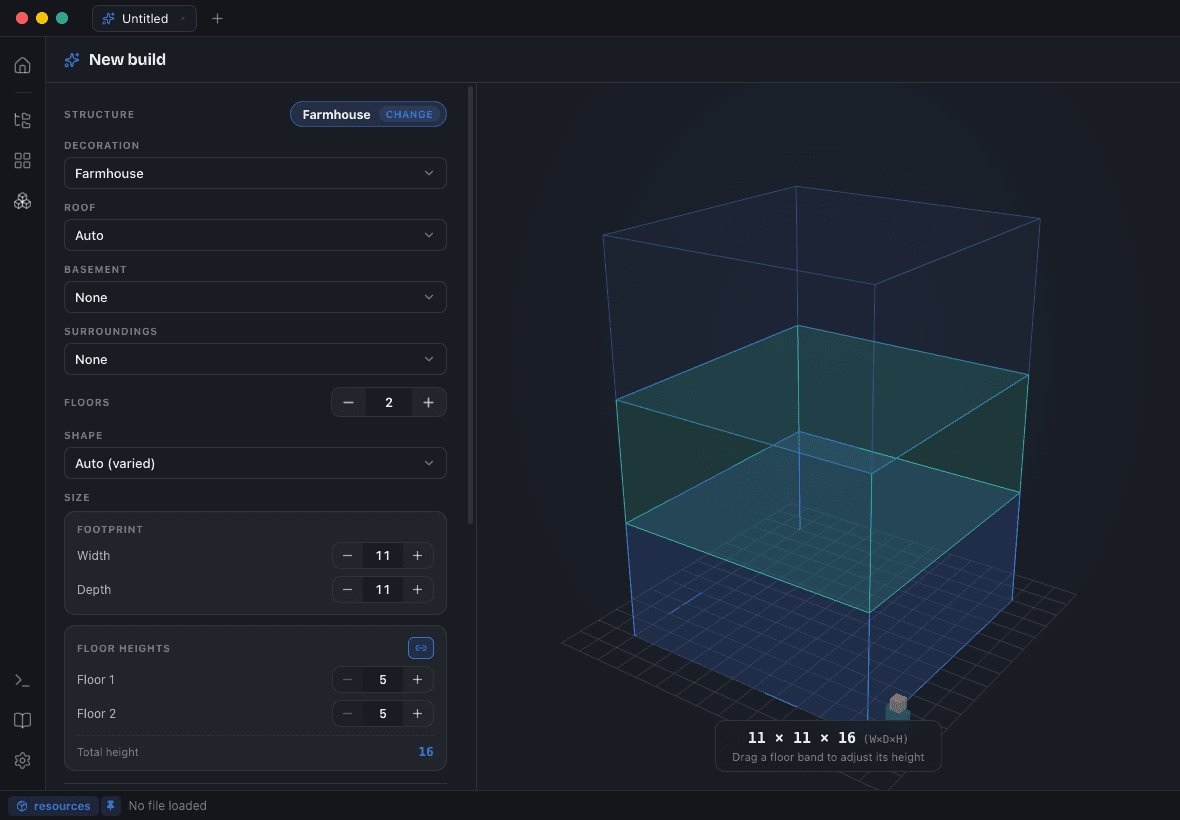
Compose a build from typed parts — roof, basement, rooms — each previewed in 3D before you generate.

Mod workspaces

Render a mod's custom blocks, then export structures into its data pack with jigsaw worldgen.

Versioned build library

Every build kept in its own folder, with all versions and a generation log.

Block Catalog

Browse 1,000+ placeable blocks with live 3D previews and copy-ready IDs.

Block entities & fluids

Chests, beds, banners and pots render right, alongside animated water and lava.

Jigsaw assembly

Preview worldgen template pools assembled from their jigsaw connectors.

Floor-plan editing

Name vertical levels as viewer bands that ride along as context on every prompt.

Light & dark themed

A polished light & dark UI with floating, dockable tool windows.

Build Planner

Compose any build from a kit of parts

Set the shell in a live 3D planner — floors, footprint, roof and basement — then mix and match parts: from a classic house or stone tower to a crypt, graveyard or séance parlour. The AI furnishes and details the rest.

Blockwright build planner with a live 3D wireframe of a two-floor house and controls for roof, basement, floors and size
How AI generation works

Emit, render, review — then refine

A single blind generation produces boxy massing and broken roofs. Blockwright instead walks the model through an iterative visual loop, so it actually sees and corrects the build.

1

You describe it

Type a prompt like “a cozy stone cottage with a furnished interior” — optionally with a reference image, size, floors and theme.

2

The model emits geometry

It writes the build as compact volumetric ops and templates — one fill is a whole wall — which Blockwright validates and compiles to a real .nbt.

3

Blockwright renders it

The compiled structure loads into the 3D viewer and is screenshotted from several angles.

4

The model reviews & refines

Those screenshots are fed back so the model critiques its own build against your prompt and re-emits an improved version — gated by an independent critic.

Ordered design passes:1 massing2 roof3 facade4 interior5 circulation6 audit
.nbtself-review loop1234
Bring your own AI

Two provider backends

Generation is provider-agnostic — pick the backend and model that suit you in Settings. The self-review loop is tuned for Claude.

Stable

Claude Code

Runs on your Claude Pro/Max plan via Claude Code — no API credits needed.

Beta

Codex

The Codex CLI on your ChatGPT Plus/Pro plan.

Live demo

From a sentence to a structure

No video — this is the emit → render → review loop, simulated. Type a build, watch the model raise it block by block.

What's new

Latest release

Pulled live from GitHub — the newest build and exactly what changed.

v2.2.0Released July 9, 2026
Full notes
Added
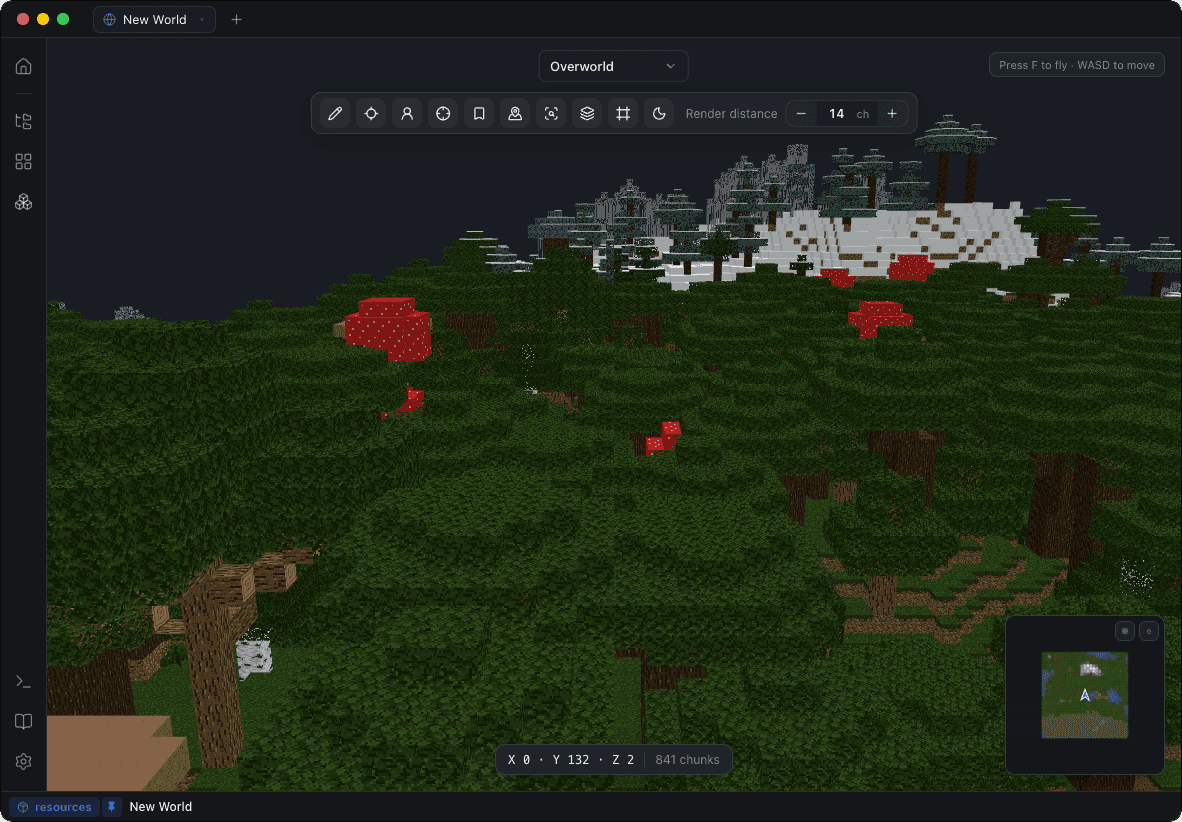
  • World editing — the world viewer became a world *editor*. Enter Edit on an open world and the block-editor tools work on real terrain: paint (brush/recolor), erase, and box select with fill/delete, with undo/redo, a hover ghost and plane-locked strokes. Edits stay local until Save to World, whose dialog previews exactly what will be written — the blocks, the chunks, the backup about to be taken — before a byte moves.
  • A safe write path no other world editor ships, on by design and not optional: the session.lock is held so Minecraft and Blockwright can't fight over the save, every touched region file is backed up before the first write (with a Restore/Delete manager in Settings ▸ World), chunk NBT is surgically patched (never re-serialized from the render model, so mod data and untouched tags survive byte-for-byte), regions are rewritten atomically, lighting/heightmaps are handed back to the game to recompute, POI records are invalidated, and a chunk that fails any gate is refused — never "best effort" written. Worlds open read-only until the master switch in Settings ▸ World is turned on.
  • Place structure into world — drop any open build (.nbt, .schem, .litematic, an AI version) into the open world as a translucent ghost, nudge it with arrows/PgUp/PgDn, rotate with R (stairs, doors and rails land facing right — orientation-correct, the transform WorldEdit still corrupts), and commit through the same safe write path. structure_void and omitted cells leave terrain untouched; minecraft:air clears, exactly like an in-game paste.
  • Extract from world — the inverse, closing the loop: box-select a region and Open as tab (edit, re-theme, diff, place it back) or Save as… (.nbt/.schem/.litematic, block entities and entities carried, oversized regions auto-split into a jigsaw assembly). Capturing from a world no longer needs in-game structure blocks at all.
  • Y-slice / underground mode — cut everything above a chosen Y away (HUD panel with a slider, [ / ] to nudge, Shift for ×8) and browse caves, dungeons and basements like a doll's house. Structures get the counterpart: storey isolation — click a storey in the new bottom-left chip and the view clips to that floor band. Both levels are remembered per world/structure (Settings ▸ Viewer).
  • Waypoints — bookmark the camera anywhere in a world (name + position + dimension, saved per world), jump back from the HUD list; jumping to a waypoint in another dimension switches there first. Spawn and last-player jumps sit beside it.
  • Cursor readout — the block under the crosshair, named: position, block id and biome, resolved live from the streamed chunks (the F3 essentials without the game). Verbosity is configurable (coords / +block / +biome).
  • Find blocks — search a block id across the loaded area ("where are my diamond ore / spawners / chests"), results nearest-first as a jump list plus amber markers visible through terrain.
  • Chunk grid + slime chunks — chunk-boundary lines around the camera (region corners highlighted) as a HUD toggle, and the minimap gained region-boundary lines plus a seed-derived slime-chunk overlay (exact Java Random math, so it matches the game).
  • Server saves — Bukkit/Spigot/Paper worlds now open whole: the sibling <world>_nether/ and <world>_the_end/ folders are discovered from the main world folder, so all three dimensions list and stream.
  • Material list — a Materials panel (View ▸ Materials, Cmd+4, or "Materials…" on the build card) rolls any open structure up into gatherable items with stack and shulker-box math: all states of a block as one row, doors and beds counted once, double slabs twice, candles/sea pickles/turtle eggs/snow layers by their live amount, source water/lava as buckets, and entities included. Exports machine-readable CSV or JSON.
  • Orthographic plan views + measure — Top/Front/Side presets for layout work (near-orthographic, so plans read as plans) and a two-point measure tool: click two blocks, read the X×Y×Z span and straight-line distance.
  • Datapack upgrader with a loss report — one action in the Worldgen Doctor upgrades the active workspace to its target Minecraft version: structure .nbts re-stamped to the target DataVersion (surgically, on the NBT tag tree — and never downgraded: a file newer than the target is reported, not touched), the structures/structure/ folder rename applied, pack.mcmeta re-stamped in both the classic pack_format and the 26.x min_format/max_format schemes, and block ids that don't resolve at the target flagged. Every change and everything it could not map is listed — nothing is silently dropped.
  • Doctor fix-its — the check-up's safe findings grew one-click Fix it buttons: move .nbts to the folder the target version reads, inject the required spawn_overrides: {}, re-stamp a stale pack format. The report re-scans after each fix.
  • /place everywhere — the copyable test command now also appears in the workspace-export success screen (/place structure with worldgen files, /place template without) and in the Jigsaw panel, so "did it assemble?" is always one paste away.
  • Missing-texture diagnostics for worlds — the 2.1 structures feature extended: the world HUD counts block types rendering as flat colors in streamed chunks (hover for the list), only when a content pack is configured.
  • Settings, one page of new knobs, each tied to a shipped behavior: World — default render distance, chunk memory cap (the "never OOM, degrade to LOD" budget), mesh worker threads (auto = scales with your CPU), default dimension on open (last used per world / always overworld), and a total size cap for backups alongside retention. Viewer — a colorblind-safe overlay palette (Okabe–Ito) for diff/void/selection marks, Y-slice memory, cursor readout verbosity. Editor — default tool on entering edit, plane-lock default, symmetry that persists across sessions, undo depth, and an unsaved-edit guard on tab close (warn / auto-save as a version / discard). AI — review screenshot size (the token/quality lever of the self-review loop) and library retention (keep the last N versions per build; generated libraries no longer grow unbounded). Files — default "Export As…" format, material-list export format, and reopen last session on launch (tabs + world).
  • macOS file associations — .nbt, .schem and .litematic register with the OS, so double-click / Open With reaches Blockwright.
Changed
  • The backup retention setting now pairs with the new total-size cap: past either limit the oldest backup sets are pruned, and the newest set always survives whatever the cap says.
  • Settings, polished as one surface: a consistent spacing rhythm across every tab, controls that line up on a single right-hand column, and one control language throughout — every boolean is the same switch (no more stray native checkboxes), every dropdown is the themed select (the AI tab's model / thinking / max-rounds pickers included; max rounds now offers an explicit "Auto"), and the sidebar tabs gained icons. The whole row of a toggle is now its click target.
Download

Get Blockwright

Available for macOS, Windows and Linux. Free and open source under the MIT license.

Looking for older versions or build-from-source instructions? Head to the releases page or the repository.

First launch shows a security warning?

The builds are open source and ad-hoc signed, but not notarized yet — so your OS asks once before opening. It's expected and safe.

macOS — right-click the app, choose Open, then Open again in the dialog.
Windows — click More info, then Run anyway.
Linux — mark the AppImage executable, or install the .deb / .rpm.
Electron 42Three.jsTypeScriptReactMIT License
FAQ

Questions, answered

Everything worth knowing before your first build.

Is Blockwright free?

Yes — it's free and open source under the MIT license, for macOS, Windows and Linux. No account, no paywall.

Do I need a paid AI subscription?

Only for AI generation — and only one you may already have. It runs on your Claude Pro/Max or ChatGPT Plus/Pro plan through Claude Code or Codex, with no separate API credits. Cost presets (Saver, Balanced, Thorough) trade quality for spend. Viewing and browsing structures need no AI at all.

What's a content pack, and do I need one?

Blockwright renders blocks with their real in-game textures, read from a Minecraft content pack you point it at — extract a version's assets and data folders. It can't bundle Mojang's assets, so it isn't shipped with one. Without a pack, structures still load; blocks just render as flat colors.

Which Minecraft versions are supported?

Any version you extract a content pack from. Mod workspaces render modded blocks with their own textures and auto-detect the mod's target Minecraft version.

Which file formats can it open?

Minecraft .nbt structures, WorldEdit .schem (Sponge) and Litematica .litematic — all of them both ways, so you can open a build in one format and export it in another. Block entities like chests and signs are carried through every conversion.

Why does my OS warn about the app on first launch?

The builds are ad-hoc signed but not notarized (there's no paid signing certificate yet), so macOS and Windows show a one-time warning. On macOS, right-click the app and choose Open; on Windows, click More info then Run anyway.

Is my data sent anywhere?

Viewing and browsing are fully local. AI generation sends your prompt — and any reference image — to your chosen provider through your own CLI and subscription. Nothing else leaves your machine.

Enjoying Blockwright?

Blockwright is a solo, open-source project. If it’s useful to you and you’d like to help fund its continued development — including the AI generation — consider buying me a coffee. Every bit is genuinely appreciated.

Buy me a coffee